Postprocessing optimization
[1]:
%config InlineBackend.figure_formats = ['svg']
%matplotlib inline
[2]:
from functools import partial

import numpy as np
import pandas as pd
from xgboost import XGBClassifier

from vassi.classification.predict import k_fold_predict
from vassi.classification.visualization import plot_classification_timeline
from vassi.classification.postprocessing import (
    optimize_postprocessing_parameters,
    summarize_experiment,
)
from vassi.config import cfg
from vassi.features import DataFrameFeatureExtractor
from vassi.io import load_dataset, from_yaml
from vassi.logging import set_logging_level
from vassi.utils import Experiment
First, import additional helper functions from helpers.py.
[3]:
from helpers import (
    postprocessing,
    smooth_model_outputs,
    subsample_train,
    suggest_postprocessing_parameters,
)
Next, define the configuration used for the trajectories. We need to define how the keypoints and timestamps were called ('keypoints' and 'timestamps', see case_studies.calms21.convert module for details). Those two are the sole data series that each trajectory consists of.
[4]:
cfg.key_keypoints = "keypoints"
cfg.key_timestamp = "timestamps"
cfg.trajectory_keys = ("keypoints", "timestamps")
Now, the training dataset can be loaded, we specify the behavioral category 'none' (renamed from other in the CALMS21 dataset) as background_category. The target of this dataset is 'dyad', i.e., we want to classify dyadic behavioral interactions between two individuals.
However, we exclude all dyads in which the intruder mouse is the actor. All behavioral annotations in the CALMS21 dataset focus on the behavior of the resident mouse.
[5]:
dataset_train = load_dataset(
    "mice_train",
    directory="../../datasets/CALMS21/train",
    target="dyad",
    background_category="none",
)

dataset_train = dataset_train.exclude_individuals(["intruder"])
2025-06-23 14:35:36.516 [WARNING ] Loading categories (attack, investigation, mount, none) from observations file, specify categories argument if incomplete.
Then, initialize a FeatureExtractor, here a DataFrameFeatureExtractor, that extracts spatiotemporal features from pairwise trajectories.
We load the configuration as specified in config_file.yaml which extracts a total of 201 features.
[6]:
extractor = DataFrameFeatureExtractor(
    cache_directory="feature_cache_mice",
    cache_mode="cached",
).read_yaml(
    "features-mice.yaml"
)

len(extractor.feature_names)
[6]:
201
The following cell is equivalent to the scripts/postprocessing_experiment-mice.py script, which uses a DistributedExperiment for MPI parallelization to perform all 20 runs in parallel. Instead, we here use a sequential Experiment without parallelization to ensure deterministic results.
This may take a long time to finish (approx. one day). We use optuna (https://optuna.org/), a framework for automated hyperparameter search to find optimal parameters for the postprocessing of classification results. optuna implements algorithms to find these optimal parameters efficiently, but we do not run these searches (https://optuna.readthedocs.io/en/stable/reference/generated/optuna.study.Study.html) with parallelization for deterministic results.
In one Experiment, num_runs (here 20) are performed. The following steps are executed to find optimal postprocessing hyperparameters in each run:
use
k_fold_predictto fitkindependent classifiers (specified with theclassifierargument) and use them to predict on the entire training dataset (specified with thedatasetargument).internally, the
sampling_function(seesubsample_trainfromhelpers.py) is used to extract samples with aDataFrameFeatureExtractor, resulting in a feature table with corresponding target categories for each dataset fold.these are then used to fit the classifiers (with balanced sample weights with
balance_sample_weights=True)
the predictions are then used to measure hyperparameter scores. The function
suggest_postprocessing_parametersdefines the search space thatoptunawill consider when optimizing the specified parameters. Eachoptuna.study.Studyperformsnum_trials(here, 2000), reporting the best parameters that yielded the highest score across all trials. See the few last cells in this notebook for details on this score.finally, the function
summarize_experimentis used to analyze and save the results of all runs, and determine the best parameters (as a consensus across runs; for each parameter, we find the value in its respective search space with highest density of best values). Averaging, for example, would be problematic when the resulting distribution of best parameters is bimodal.
[7]:
run_locally = False

if run_locally:
    log = set_logging_level("info")
    studies = optimize_postprocessing_parameters(
        dataset_train,
        extractor,
        XGBClassifier(n_estimators=1000),
        postprocessing_function=postprocessing,
        suggest_postprocessing_parameters_function=suggest_postprocessing_parameters,
        num_trials=2000,
        k=5,
        sampling_function=subsample_train,
        balance_sample_weights=True,
        experiment=Experiment(20, random_state=1),
        log=log,
    )
    best_parameters = summarize_experiment(
        studies,
        results_file="optimization/optimization-results.yaml",
        summary_file="optimization/optimization-summary.yaml",
        trials_file="optimization/optimization-trials.csv",
        log=log,
    )
Instead, only load the best parameters that were written to optimization-summary.yaml.
[8]:
best_parameters = from_yaml("optimization/optimization-summary.yaml")
best_thresholds = [best_parameters[f"threshold-{category}"] for category in dataset_train.categories]

print(f"Best thresholds:\n\n{best_thresholds}\n")
print(f"Best paramaters (including thresholds):\n\n{pd.Series(best_parameters)}")
Best thresholds:

[0.10489124120493357, 0.003391166980093018, 0.4593501151544584, 0.1385896361716828]

Best paramaters (including thresholds):

smoothing_function                               mean
quantile_range_window_lower-attack                 91
quantile_range_lower-attack                  0.473955
quantile_range_window_upper-attack                 79
quantile_range_upper-attack                  0.561892
smoothing_window-attack                            35
quantile_range_window_lower-investigation          25
quantile_range_lower-investigation           0.227794
quantile_range_window_upper-investigation          35
quantile_range_upper-investigation           0.519027
smoothing_window-investigation                     39
quantile_range_window_lower-mount                  59
quantile_range_lower-mount                   0.061238
quantile_range_window_upper-mount                  73
quantile_range_upper-mount                   0.750158
smoothing_window-mount                             65
quantile_range_window_lower-none                   17
quantile_range_lower-none                     0.18022
quantile_range_window_upper-none                   51
quantile_range_upper-none                    0.663302
smoothing_window-none                              19
threshold-attack                             0.104891
threshold-investigation                      0.003391
threshold-mount                               0.45935
threshold-none                                0.13859
dtype: object
Now, we use k-fold to predict on the entire training dataset, fitting a separate classifier on each dataset fold (k=5). These classifiers are then used to predict on their fold’s respective holdout data.
[9]:
from helpers import *
[10]:
k_fold_result = k_fold_predict(
    dataset_train,
    extractor,
    XGBClassifier(n_estimators=1000),
    k=5,
    sampling_function=subsample_train,
    balance_sample_weights=True,
    log=set_logging_level("success"),
    random_state=1,
)
/home/paul/miniforge3/envs/vassi/lib/python3.13/site-packages/sklearn/model_selection/_split.py:784: UserWarning: The number of unique classes is greater than 50% of the number of samples.
  type_of_target_y = type_of_target(y)
2025-06-23 14:35:38.433 [SUCCESS ] [fold: 0/5] finished sampling in 1.03 seconds
2025-06-23 14:38:00.953 [SUCCESS ] [fold: 0/5] finished fitting XGBClassifier in 142.51 seconds
2025-06-23 14:38:08.017 [SUCCESS ] [fold: 0/5] finished predicting on dataset in 7.06 seconds
2025-06-23 14:38:09.502 [SUCCESS ] [fold: 1/5] finished sampling in 1.44 seconds
2025-06-23 14:40:38.043 [SUCCESS ] [fold: 1/5] finished fitting XGBClassifier in 148.53 seconds
2025-06-23 14:40:42.851 [SUCCESS ] [fold: 1/5] finished predicting on dataset in 4.81 seconds
2025-06-23 14:40:44.313 [SUCCESS ] [fold: 2/5] finished sampling in 1.42 seconds
2025-06-23 14:43:11.330 [SUCCESS ] [fold: 2/5] finished fitting XGBClassifier in 147.00 seconds
2025-06-23 14:43:17.576 [SUCCESS ] [fold: 2/5] finished predicting on dataset in 6.24 seconds
2025-06-23 14:43:19.060 [SUCCESS ] [fold: 3/5] finished sampling in 1.44 seconds
2025-06-23 14:45:46.257 [SUCCESS ] [fold: 3/5] finished fitting XGBClassifier in 147.18 seconds
2025-06-23 14:45:51.335 [SUCCESS ] [fold: 3/5] finished predicting on dataset in 5.08 seconds
2025-06-23 14:45:52.801 [SUCCESS ] [fold: 4/5] finished sampling in 1.42 seconds
2025-06-23 14:48:21.889 [SUCCESS ] [fold: 4/5] finished fitting XGBClassifier in 149.07 seconds
2025-06-23 14:48:27.106 [SUCCESS ] [fold: 4/5] finished predicting on dataset in 5.21 seconds
2025-06-23 14:48:27.110 [SUCCESS ] finished k-fold cross-validation in 769.73 seconds
With this, we can calculate per-category f1 scores on three levels:
timestamp (i.e., video frames)
annotation (ground-truth, annotated intervals)
prediction (predicted intervals)
In the optimization above, optuna used the unweighted avarage of these three scores (and across all categories) to determine the best parameters.
For levels 2 and 3 (interval-based scores), the corresponding true or predicted labels are chosen from the interval with the longest overlap duration.
Thresholding sets the model outputs (probabilities) below the specified threshold for each category to 0. Subsequently, the category with the highest probability is selected, otherwise, if all categories were below their threshold, falling back to the default_decision (which is usually the background category, here 'none').
[11]:
from interactive_table import Table
[12]:
scores = postprocessing(
    k_fold_result,
    postprocessing_parameters=best_parameters,
    decision_thresholds=best_thresholds,
    default_decision="none",
).score()

Table(scores)
[12]:
The cell above is using the predefined postprocessing function from helpers.py, which is equivalent to the following code (step-by-step):
use
functools.partialto bind the best postprocessing parameters to their corresponding, predefined smoothing functionsmooth_model_outputs(also fromhelpers.py). This is similar to using alambdafunction, but can be used with multiprocessing.use the
result.smoothmethod with the resulting function to apply smoothing with the optimal parameters.use the
result.thresholdmethod with the optimal decision thresholds. Make sure to define the default decision (here, the background category ‘none’).
[13]:
optimized_model_output_smoothing = partial(smooth_model_outputs, best_parameters)

k_fold_result = k_fold_result.smooth(optimized_model_output_smoothing)
k_fold_result = k_fold_result.threshold(best_thresholds, default_decision="none")

Table(k_fold_result.predictions)
[13]:
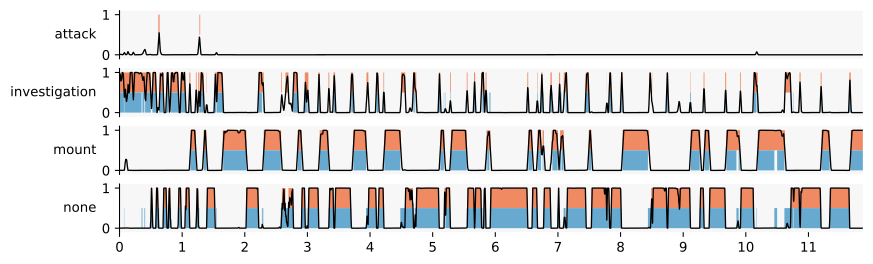
Finally, these predictions can be visualized, for example in a behavioral timeline (gantt-plot) below.
Here, we select the first sequence in the training dataset (0). Note that each sequence is a group with a single, directed dyad: ("resident", "intruder").
[14]:
dyad_results = k_fold_result.classification_results[0].classification_results[
    ("resident", "intruder")
]

plot_classification_timeline(
    dyad_results.predictions,
    dyad_results.categories,
    annotations=dyad_results.annotations,
    timestamps=dyad_results.timestamps,
    interval=(-np.inf, np.inf),
    y_proba_smoothed=dyad_results.y_proba_smoothed,
    x_tick_step=(60 * 30),
    x_tick_conversion=lambda ticks: [int(tick / (30 * 60)) for tick in ticks],
)