Minimal example
This notebooks reproduces the code-blocks and figures from the basic usage page.
[1]:
%matplotlib inline
%config InlineBackend.figure_formats = ['svg']
[2]:
from vassi.config import cfg
from vassi.io import load_dataset
from vassi.features import DataFrameFeatureExtractor
from vassi.classification.predict import predict
from vassi.classification.visualization import (
    plot_confusion_matrix,
    plot_classification_timeline,
)

from sklearn.ensemble import RandomForestClassifier
[3]:
cfg.key_keypoints = "keypoints"
cfg.key_timestamp = "timestamps"

cfg.trajectory_keys = ("keypoints", "timestamps")
1. Load training dataset and extract features
[4]:
dataset_train = load_dataset(
    "mice_train",
    directory="../../datasets/CALMS21/train",
    target="dyad",
    background_category="none",
)
dataset_train = dataset_train.exclude_individuals(["intruder"])

dataset_train.category_counts
2025-06-25 12:32:43.078 [WARNING ] Loading categories (attack, investigation, mount, none) from observations file, specify categories argument if incomplete.
[4]:
{'attack': 14039, 'investigation': 146615, 'mount': 28615, 'none': 318469}
[5]:
extractor = DataFrameFeatureExtractor(cache_mode=False)
extractor.read_yaml("features-mice.yaml")

len(extractor.feature_names)
[5]:
201
[6]:
%%time

X, y = dataset_train.subsample(
    extractor,
    size={category: 1000 for category in dataset_train.categories},
    random_state=1,
)
y = dataset_train.encode(y)
CPU times: user 15.2 s, sys: 331 ms, total: 15.5 s
Wall time: 15.5 s
2. Fit classification model
[7]:
%%time

classifier = RandomForestClassifier(random_state=1)
classifier.fit(X, y)
CPU times: user 4.25 s, sys: 49 μs, total: 4.25 s
Wall time: 4.25 s
[7]:
RandomForestClassifier(random_state=1)In a Jupyter environment, please rerun this cell to show the HTML representation or trust the notebook.
On GitHub, the HTML representation is unable to render, please try loading this page with nbviewer.org.
Parameters
| n_estimators | 100 | |
| criterion | 'gini' | |
| max_depth | None | |
| min_samples_split | 2 | |
| min_samples_leaf | 1 | |
| min_weight_fraction_leaf | 0.0 | |
| max_features | 'sqrt' | |
| max_leaf_nodes | None | |
| min_impurity_decrease | 0.0 | |
| bootstrap | True | |
| oob_score | False | |
| n_jobs | None | |
| random_state | 1 | |
| verbose | 0 | |
| warm_start | False | |
| class_weight | None | |
| ccp_alpha | 0.0 | |
| max_samples | None | |
| monotonic_cst | None |
3. Load test dataset and predict
[8]:
dataset_test = load_dataset(
    "mice_test",
    directory="../../datasets/CALMS21/test",
    target="dyad",
    background_category="none",
)
dataset_test = dataset_test.exclude_individuals(["intruder"])
2025-06-25 12:33:03.986 [WARNING ] Loading categories (attack, investigation, mount, none) from observations file, specify categories argument if incomplete.
[9]:
%%time

result_test = predict(dataset_test, classifier, extractor)
CPU times: user 7.57 s, sys: 36.1 ms, total: 7.6 s
Wall time: 7.59 s
4. Visualizations and evaluation
[10]:
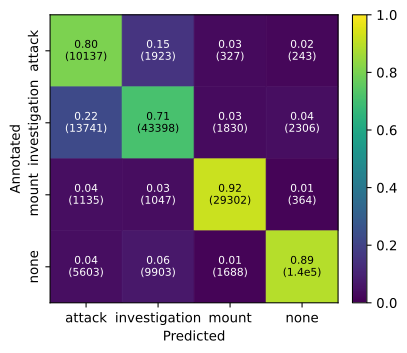
plot_confusion_matrix(
    result_test.y_true_numeric,
    result_test.y_pred_numeric,
    category_labels=result_test.categories,
)

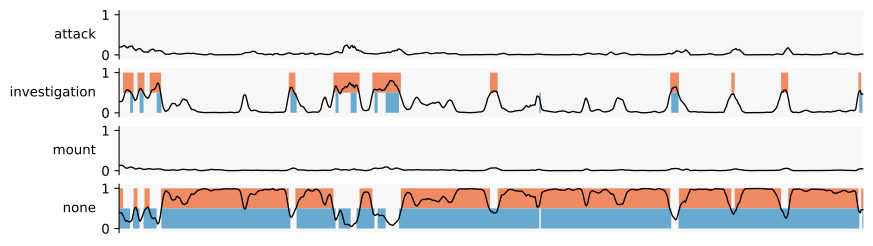
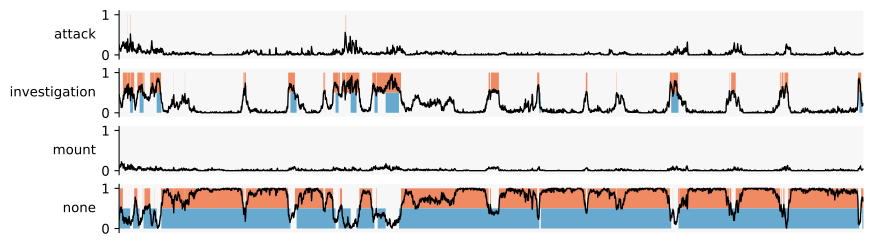
result_group = result_test.classification_results[10]
result_dyad = result_group.classification_results[("resident", "intruder")]

plot_classification_timeline(
    result_dyad.predictions,
    annotations=result_dyad.annotations,
    categories=result_dyad.categories,
    y_proba=result_dyad.y_proba,
    timestamps=result_dyad.timestamps,
)
Compute the F1 score for each category on the per-frame (timestamp) level:
[11]:
result_test.f1_score("timestamp")
[11]:
attack           0.468806
investigation    0.738400
mount            0.901669
none             0.932623
Name: timestamp, dtype: float64
This is also available for two other levels, i.e., annotation and prediction intervals.
when computing scores on prediction intervals, the category of the ground-truth interval with maximum overlap is considered as the true category
when computing scores on annotation intervals, the category of the predicted interval with maximum overlap is considered as the predicted category
With this in mind, the F1 score of predictions is related to the precision of predicted intervals, whereas the F1 score of annotations is related to the recall of annotated intervals.
[12]:
result_test.f1_score("annotation")
[12]:
attack           0.494450
investigation    0.684685
mount            0.822115
none             0.849611
Name: annotation, dtype: float64
[13]:
result_test.f1_score("prediction")
[13]:
attack           0.274927
investigation    0.532850
mount            0.480562
none             0.539296
Name: prediction, dtype: float64
And made available as a summary:
interactive-table is a custom tabular data display that we developed for interactive inspection of behavioral classification results. Here, we use it for a better visualization of pandas DataFrames in our documentation.
Important: note that not all interactive fuctions are executed properly without an active python kernel.
[14]:
from interactive_table import Table

Table(result_test.score())
[14]:
We later use the unweighted average of all these scores to find optimal postprocessing hyperparameters.
To compare the predictions with the results of other behavioral classification tools using the CALMS21 dataset, we can compute the macro (unweighted average) F1 score of the behavioral foreground categories (‘attack’, ‘investigation’ and ‘mount’):
[15]:
foreground_categories = list(dataset_train.foreground_categories)

macro_f1 = result_test.f1_score("timestamp")[foreground_categories].mean()

macro_f1
[15]:
np.float64(0.702958669540446)
Note that this is only a simple model that was trained on a very small subset of the available data for demonstration purposes.
[16]:
Table(result_test.predictions)
[16]:
5. Postprocessing (smoothing)
[17]:
from vassi.sliding_metrics import sliding_mean

result_test_smoothed = result_test.smooth(lambda array: sliding_mean(array, window_size=31))

macro_f1_smoothed = (
    result_test_smoothed
    .f1_score("timestamp")[foreground_categories]
    .mean()
)

plot_confusion_matrix(
    result_test_smoothed.y_true_numeric,
    result_test_smoothed.y_pred_numeric,
    category_labels=result_test_smoothed.categories,
)

print("Macro foreground F1 score:", macro_f1, "->", macro_f1_smoothed)
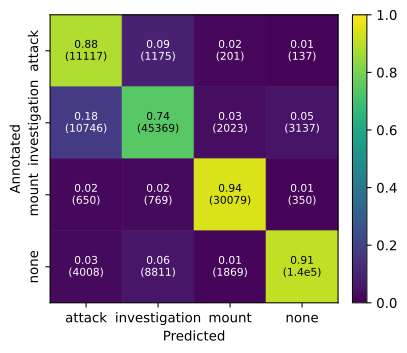
Macro foreground F1 score: 0.702958669540446 -> 0.7506717157154005
As you can see above, simple smoothing with a sliding mean (window size of ~ one second) can already improve the performance of this basic model.
Note that for simplicity, we here just chose a small window size, but this should be ideally tested or optimized on a part of the training dataset (or using cross validation) and not on the test dataset to avoid leakage.
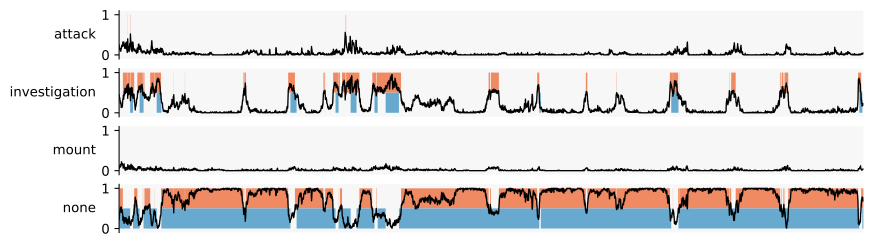
In the comparison below, you can see that this improvement is likely associated with a decrease in very short predictions and frequent back-and-forth between predicted categories. Therefore, smoothing may also reduce temporal resolution or accuracy, so it is advisable to tune such hyperparameters carefully.
[18]:
result_dyad_smoothed = result_test_smoothed.classification_results[10].classification_results[("resident", "intruder")]

print("before smoothing")
plot_classification_timeline(
    result_dyad.predictions,
    annotations=result_dyad.annotations,
    categories=result_dyad.categories,
    y_proba=result_dyad.y_proba,
    timestamps=result_dyad.timestamps,
)

print("after smoothing")
plot_classification_timeline(
    result_dyad_smoothed.predictions,
    annotations=result_dyad_smoothed.annotations,
    categories=result_dyad_smoothed.categories,
    y_proba_smoothed=result_dyad_smoothed.y_proba_smoothed,
    timestamps=result_dyad_smoothed.timestamps,
)
before smoothing
after smoothing